Choosing a business two way radio system comes down to five questions: where your team works, how far they need to talk, how many groups need their own channel, whether you need an FCC license, and what the radios have to survive every shift. Get those right and your system will serve your operation for the next 5 to 10 years. Get them wrong and you end up with dead spots, crowded channels, and radios sitting in a drawer.
This guide walks through each decision in the same order we work through it with customers. Whisler Communications has been setting up two-way radio systems for businesses across Southwest Washington from our shop in Olympia since 1959, so the advice here comes from real installs, not spec sheets.
Business Radios vs Consumer Walkie Talkies
A lot of first-time buyers start at the big box store. Those radios almost always run on the Family Radio Service, which the FCC caps at 2 watts. They use fixed antennas, share 22 channels with every other FRS user nearby, and can’t work through a repeater. That’s fine for a family camping trip. It falls short for a 40-person warehouse shift or a crew spread across a job site.
Commercial business radios are certified for the FCC’s Part 90 land mobile rules, and that changes what they can do:
- More power. Portables run up to 5 watts and vehicle mobiles run 25 to 50 watts.
- Your own frequencies. A licensed system means you aren’t sharing channels with the restaurant next door.
- Repeater support. A repeater can stretch coverage from one building to a whole city or county.
- Programmable channels and talk groups. You can reorganize the fleet as your business changes.
- Built for work. Commercial radios are made to handle drops, rain, dust and full shifts, and they come with parts and repair support.
When people search for “business band” radios, they usually mean these Part 90 frequencies, which the FCC sets aside in its Industrial/Business Radio Pool. For a deeper side by side, see our breakdown of walkie talkies vs two-way radios.
Step 1: Map Where Your Team Works
Your environment decides your frequency band, and the band decides how well your signal gets where it needs to go.
VHF (136 to 174 MHz) carries farther over open ground. It’s the better fit for agriculture, forestry, outdoor construction, and rural sites with few buildings in the way.
UHF (400 to 512 MHz) penetrates walls, concrete and steel better. It’s the default for warehouses, hospitals, hotels, schools, retail and office buildings.
If your team works both indoors and out, UHF is usually the safer choice. If you need to cover multiple buildings, a large campus, or a stretch of highway, plan for a repeater from the start. Our guide to how radio repeaters extend communication range explains how that works in Washington terrain. If you’re in a busy area with lots of other radio traffic, it’s also worth reading up on preventing signal interference in commercial radio systems.
Step 2: Choose Analog, Digital, or Both
Analog radios cost less and work with older equipment. The tradeoff is audio quality: as the signal weakens, static creeps in until the message is hard to make out.
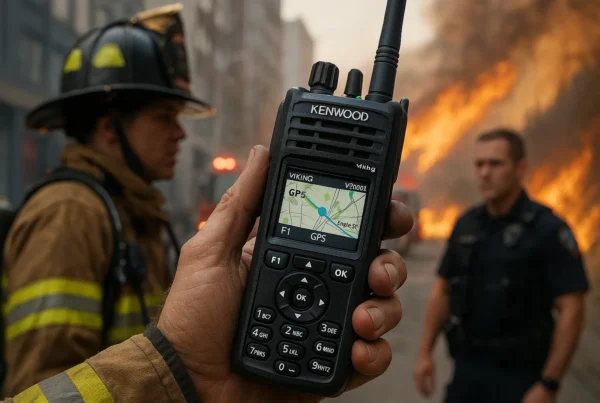
Digital radios hold clear audio right up to the edge of coverage, then cut out. They also unlock features analog can’t offer: GPS location, text messaging, emergency and man-down alerts, and encryption. Some digital standards, like DMR, carry two separate conversations on a single 12.5 kHz channel, which helps busy operations get more out of one license. Kenwood’s NEXEDGE radios use the NXDN standard, and many Kenwood and Icom models support more than one protocol.
One thing to watch: different digital standards don’t talk to each other. Pick one standard for the whole fleet, and if you’re migrating from analog, choose dual-mode radios so old and new can share channels during the switch. For most professional teams in 2026, digital is the right call. Here are the top benefits of upgrading to digital two-way radios.
Step 3: Pick the Right Type of System
This is the part most buying guides skip, and it’s where the “system” in business two way radio systems really matters. The radios are only half the decision. How they connect decides your coverage, capacity and monthly cost.
Direct radio to radio
Radios talk straight to each other with no infrastructure in between. It’s the simplest and cheapest setup, and it works well for a single building or a compact site. Range depends heavily on terrain and walls.
Conventional repeater system
A repeater mounted on a building or tower picks up each transmission and rebroadcasts it at higher power. Depending on the site, that can cover a campus, a town, or a big piece of a county. This is the most common setup for mid-size businesses.
Trunked radio system
A trunked system shares a pool of channels automatically across many talk groups, so nobody waits for a free channel. It suits operations with 50 or more users or several departments that each need their own conversation. We cover it in depth in trunked radio systems explained.
Wide-area network
A wide-area network links several repeater sites into one system, so a crew in Shelton and dispatch in Olympia stay on the same talk group. Learn more about wide-area digital radio networks or see how our own Wide Area Network covers Southwest Washington.
LTE push-to-talk
LTE push-to-talk radios use cellular networks instead of towers you own. Coverage can be nationwide, there’s no frequency license to manage, and you pay a monthly service fee per radio. The catch is that coverage depends on the cell network. Here’s why PoC is replacing traditional two-way radios for many fleets.
Plenty of businesses run a hybrid: licensed radios on site, plus LTE radios for drivers and staff who travel.
Step 4: Portables, Mobiles, and Dispatch
Portables are handhelds for people on foot, typically 1 to 5 watts.
Mobiles mount in vehicles, run 25 to 50 watts, and use an external antenna, which gives them much more range than a handheld.
Base stations and dispatch consoles sit at a front desk, office or control room. A two way radio dispatch system lets one coordinator monitor several talk groups at once, and with digital radios it can show where every unit is on a map.
Most businesses end up with a mix of all three on one system. Good installation matters as much as good equipment, so read our two-way radio installation guide before you mount antennas or wire vehicles.
Step 5: Plan Channels and Talk Groups
A channel is a frequency your radios use. A talk group is a set of users who hear each other on that system. Planning these well keeps the right people in the loop without everyone stepping on each other.
A hotel might set up front desk, housekeeping, maintenance, security, and an all-call group for emergencies. A warehouse might split receiving, shipping, forklift operators and supervisors. A construction company might give each job site its own group plus one for the yard and office.
Plan for 20 to 30 percent more groups than you need today. Adding talk groups later is easy with a programmable system, but it’s easier still if your license and channel plan already allow for growth.
Step 6: Sort Out Licensing
Licensing is where a lot of businesses get tripped up.
- FRS and MURS are licensed by rule, which means no individual license is needed. Both are limited to low power. MURS tops out at 2 watts and has only five channels.
- GMRS requires an FCC license, and new GMRS licenses are issued to individuals, not companies, so it isn’t a good fit for a business fleet. Our FRS vs GMRS guide covers the details.
- Part 90 business licenses give you assigned frequencies, higher power, and repeater use. Applications go through frequency coordination, and licenses are typically renewed every 10 years.
One more thing to check: Part 90 systems below 512 MHz have been required to use 12.5 kHz narrowband channels since 2013. If your fleet includes very old radios, they may not be legal to operate anymore.
Not sure where you stand? Start with do you need a license for two-way radios and our overview of FCC regulations for two-way radio use. Whisler handles license applications, frequency coordination and renewals for our customers, so you don’t have to work through the FCC paperwork alone.
Step 7: Match Features to the Job
Once the system is settled, features are where you fine tune for your team:
- Battery life that covers a full 10 to 12 hour shift, with spare batteries or multi-unit chargers for round-the-clock operations.
- Durability ratings such as MIL-STD-810 and IP67 or IP68 for crews working in rain, dust or around water.
- GPS and emergency alerts so supervisors know where people are when it counts. See two-way radios with GPS and emergency alerts.
- Man-down and lone worker features that trigger an alert when a radio goes still or tilts. These matter for safety programs and OSHA compliance.
- Encryption for security teams, healthcare, and anyone discussing sensitive information over the air.
- Noise cancelling audio for loud plants, job sites and events.
Recommended Radios by Business Type
These are starting points. The right model depends on your site, your system type and your budget, which is what a site assessment sorts out.
Retail, hotels, offices and indoor teams: The Kenwood NX-1200 and NX-1300 series are compact, affordable and support both analog and NEXEDGE digital. The Icom F1000D and F2000D series are another solid option. Hotels can find more in our guide to two-way radios for hotels and hospitality staff.
Warehouses, manufacturing and facilities: The Kenwood NX-3220 and NX-3320 are rugged, multi-protocol radios built for heavy daily use. See our picks for warehouse and manufacturing teams.
Construction and outdoor crews: The same NX-3000 series in VHF handles open sites well. Our construction radio guide covers job site setups.
Fleets and vehicles: Kenwood NX-1202 and NX-1302 mobiles and Motorola mobile radios work well on a licensed system. For drivers who leave your coverage area, LTE units like the Diga-Talk+ 8051 make more sense. See two-way radios for transportation and logistics fleets.
Multi-site and regional operations: LTE portables like the Diga-Talk+ 9850, or a connection to a wide-area network.
Security, healthcare and public safety adjacent teams: The Kenwood NX-5200 and NX-5300 and Kenwood Viking radios offer advanced encryption and P25 capability for teams that need to coordinate with first responders. See our guides for security teams and hospitals and healthcare facilities.
Comparing Kenwood models specifically? Our Kenwood radio buyer’s guide breaks down NEXEDGE, the NX series and Viking side by side.
What Drives the Cost of a Business Radio System
Every system is quoted to the site, but these are the factors that move the number:
- How many radios you need, and the mix of portables, mobiles and base stations
- Analog vs digital, since digital radios cost more up front
- Infrastructure, including repeaters, antennas, and tower or rooftop site space
- Licensing and frequency coordination fees
- Programming and installation, especially for vehicle mobiles
- Accessories like spare batteries, chargers, speaker mics and earpieces
- Ongoing service, either maintenance on your own system or a monthly fee for LTE
LTE systems trade infrastructure cost for a monthly service plan. We break those numbers down in how much LTE two-way radios cost. Whatever you choose, regular upkeep stretches your investment, and our guide to two-way radio maintenance and lifespan shows how. If your current radios are already struggling, here are 5 signs it’s time to upgrade your radio system.
How Whisler Sets Up Business Radio Systems
We start with a site assessment to see where your people work and where coverage needs to reach. From there we recommend the system type and radios, handle the FCC licensing and frequency coordination, program every radio to your channel plan, and install mobiles, base stations and antennas. After you’re up and running, we stay on for repairs, reprogramming and expansion as your team grows.
Whisler Communications is family owned and has served businesses since 1959 across the industries we serve in Thurston, Pierce, Mason, Lewis, Grays Harbor, Kitsap and Clark counties. Call us at (360) 352 8777 or contact us to set up a free consultation.
Frequently Asked Questions
What is the best two way radio system for a small business?
For a single building or small site, a set of UHF digital portables talking direct is often all you need. If your team covers a larger area or works across several buildings, add a repeater. If staff travel beyond local coverage, look at LTE push-to-talk.
Do businesses need a license for two way radios?
License-free FRS and MURS radios don’t need one, but they’re limited to low power and shared channels. Most commercial business radios operate under an FCC Part 90 license, which gives you assigned frequencies, more power, and repeater use.
What’s the difference between business and consumer two way radios?
Business radios have more power, programmable channels, repeater support, licensed frequencies, and tougher construction. Consumer radios are capped at low power on shared FRS channels and aren’t built for daily professional use.
How far can business two way radios reach?
Handheld to handheld, a mile or two is typical in mixed terrain, less inside large buildings. A repeater can extend coverage across a city or county, a wide-area network links multiple regions, and LTE radios reach anywhere with cellular service.
Can two way radios work alongside cell phones?
Yes. LTE push-to-talk services often let smartphone users join the same talk groups as radio users through an app. Here’s more on the key differences between two-way radios and cell phones.